

LIVE Auto-Combine Order
Livestream Auto-Combine
LIVE Auto-Combine helps sellers reduce duplicate shipping costs and encourage repeat purchases during LIVE. When eligible orders are placed during the same LIVE session, TikTok Shop can automatically combine them into one shipment when the buyer, delivery address, seller, and warehouse are the same.If sellers manually modify auto-combined packages after system processing, additional shipping fee adjustments may apply depending on the carrier rules. Sellers can review package information before shipping label creation.
- Auto Combine options:
- Provide Free Shipping for Additional LIVE Orders: Encourage buyers to place multiple orders during LIVE by offering free shipping from the 2nd order onward.
- Charge Reduced Combined Shipping Fees: Only incremental shipping fees are charged for eligible combined shipments.
- Manual Package Management Only [Default Option]: Packages can still be manually combined during shipping label creation.
| Buyer places: | If both orders are eligible for Auto-Combine: | Sellers can: |
| • Order A during LIVE at 20:01• Order B during the same LIVE at 20:05 | • Orders are merged into one shipment• Buyer receives reduced shipping fees• Seller prepares one package instead of two |
|
Orders are eligible for LIVE Auto-Combine when:
• Orders are placed during the same LIVE• Buyer account is the same
• Delivery address is the same
• Seller and fulfillment warehouse are the same
• Orders meet carrier size and weight requirements
Order Combination Rules
This table shows the order combination countdown rules for different seller fulfillment types. The countdown starts from the first customer order, and the time window indicates how long the second order remains eligible to be combined with the first order.4PL | 3PL | |
| Free Shipping for continuous Live orders | 3 hours | 3 hours |
| Charge incremental costs for orders available to combine | 6 hours | 6 hours |
How to Opt-in?
You can quickly enable the feature in your Seller Center account by navigating to:Logistics > Fulfillment > Automated order combination
- Navigate to Logistics in Seller Center
- Click the edit icon for Automated order combination
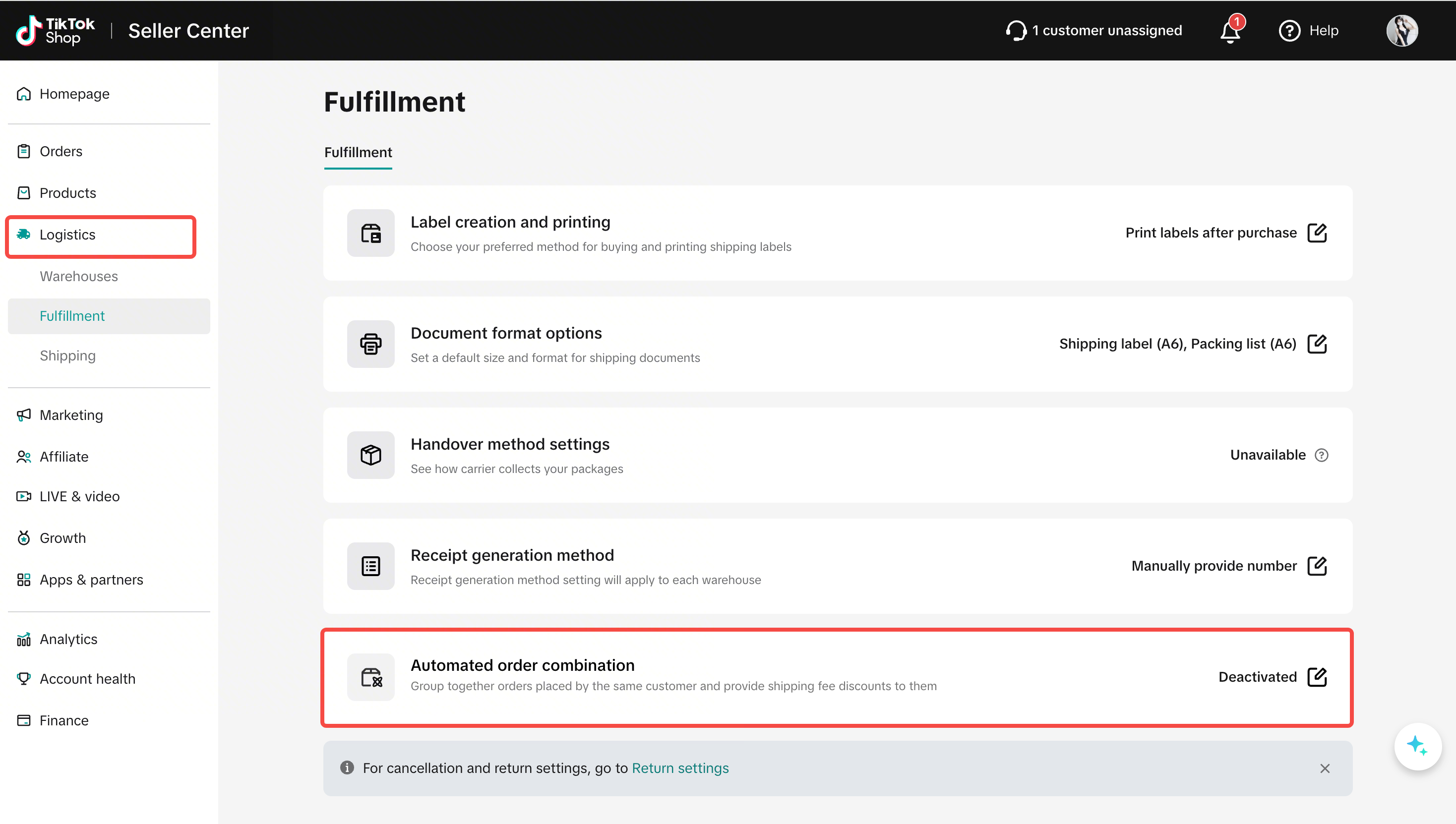
- After clicking the edit icon, you will be jumped to the Shipping Page
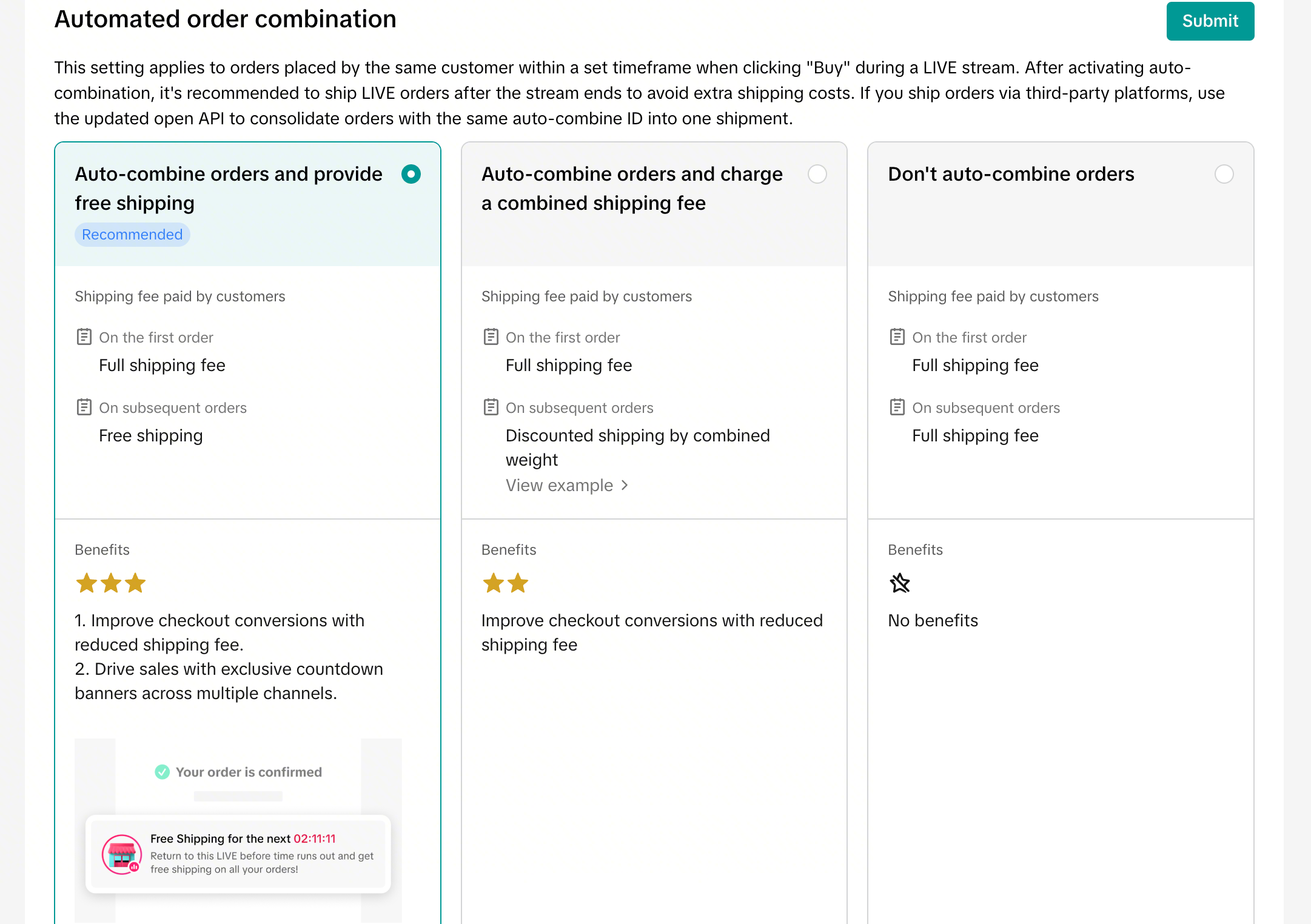
- You are presented with the Automated order combination options.
- Till you make a choice, you will be defaulted to the opt-out option.

- Till you make a choice, you will be defaulted to the opt-out option.
- Click the desired radio button to make the selection of your choice, then hit "Submit" to register selection.
- Auto Combine Orders and provide Free Shipping:
- This will offer free shipping from the 2nd order onwards for continuously placed LIVE orders from the same buyer. The LIVE will show free shipping info to encourage customers to place more orders.
- Scroll down, you will see the Free Shipping expression.
- Auto Combine Orders and provide Free Shipping:
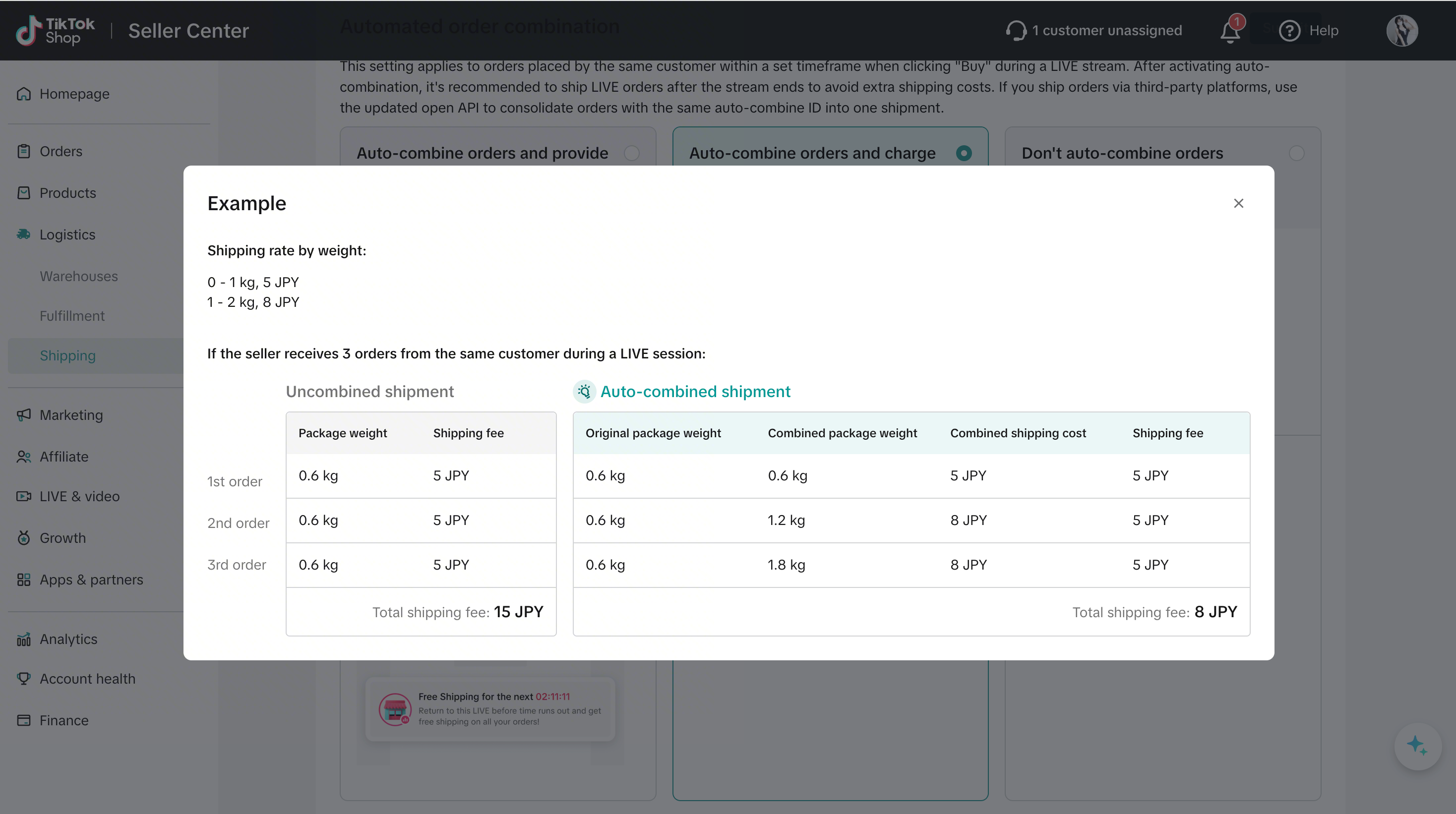
- Only charge incremental shipping costs for orders that can be combined into one shipment with existing orders.
- Click View example > to understand incremental shipping fee logic.
- Auto Combine Orders and charge a combined shipping fee:
FAQs
- What happens if one order is cancelled after orders are combined?
- Can sellers manually un-combine orders?
- Can oversized items be combined?
- Will buyers receive one tracking number after the order combination?
- Can sellers disable the order combination feature at any time?
- When can I start fulfilling LIVE orders?
- TikTok Shop will auto-combine all orders placed during a LIVE and calculate shipping fees based on the combined orders. To optimize efficiency and reduce costs, sellers are advised to begin order fulfillment only after concluding their daily LIVE session.
- For sellers running 24-hour LIVE, it is recommended to process and fulfill orders at 6-hour intervals.
- How will the feature work for different types of sellers?
- 4PL sellers will be able to opt-in to the feature, view auto combined orders in Manage Orders, view combined package details, uncombine and re-combine packages, and buyer and print shipping labels.
- 3PL sellers will be able to opt-in to the feature, view auto combined orders in Manage Orders, view combined package details, uncombine and re-combine packages, and confirm shipment.
- GS (FS) sellers will be able to opt-in to the feature, Tiktok platform will manage shipping and combination for them.
- For cross-border sellers, only overseas warehouse (OWH) sellers will be able to opt-in to the feature, view auto combined orders in Manage Orders, view combined package details, uncombine and re-combine packages, and confirm shipment. Direct shipping (DS) sellers are not supported at this time.
- Can sellers use the package combine shipping fee discount for auction orders?
Yes. the package combine shipping fee discount is applicable to auction orders. Sellers who have opted in to the feature will be able to enjoy the combined shipping discount across both regular and auction orders placed during the same LIVE session.
- Can a seller ship packages during a LIVE?
Yes. however, we would recommend waiting till the completion of the LIVE as the TikTok fulfillment system will calculate the combination logic and shipping fee based off the orders placed for the duration of the LIVE. Shipping earlier than the completion of the LIVE might incur an additional shipping fee.
- Can content creator opt in to package combine?
No. content creators cannot combine packages, because their LIVE is for multiple sellers/brands.
- Do we notify buyers of the benefits?
Buyers will be notified of the benefits when they join a seller LIVE (not creator LIVE) who has opted-in to the free shipping package combine.