

TikTok Shop Seller Center navigation update: what's changed
We've reorganised the Seller Center menu so that tools you use together now sit together. Your features, data and account permissions haven't changed. Only their location in the menu has changed.
Looking for Promotions? Promotions have moved from Marketing to the new Shop menu. Go to Shop > Promotions.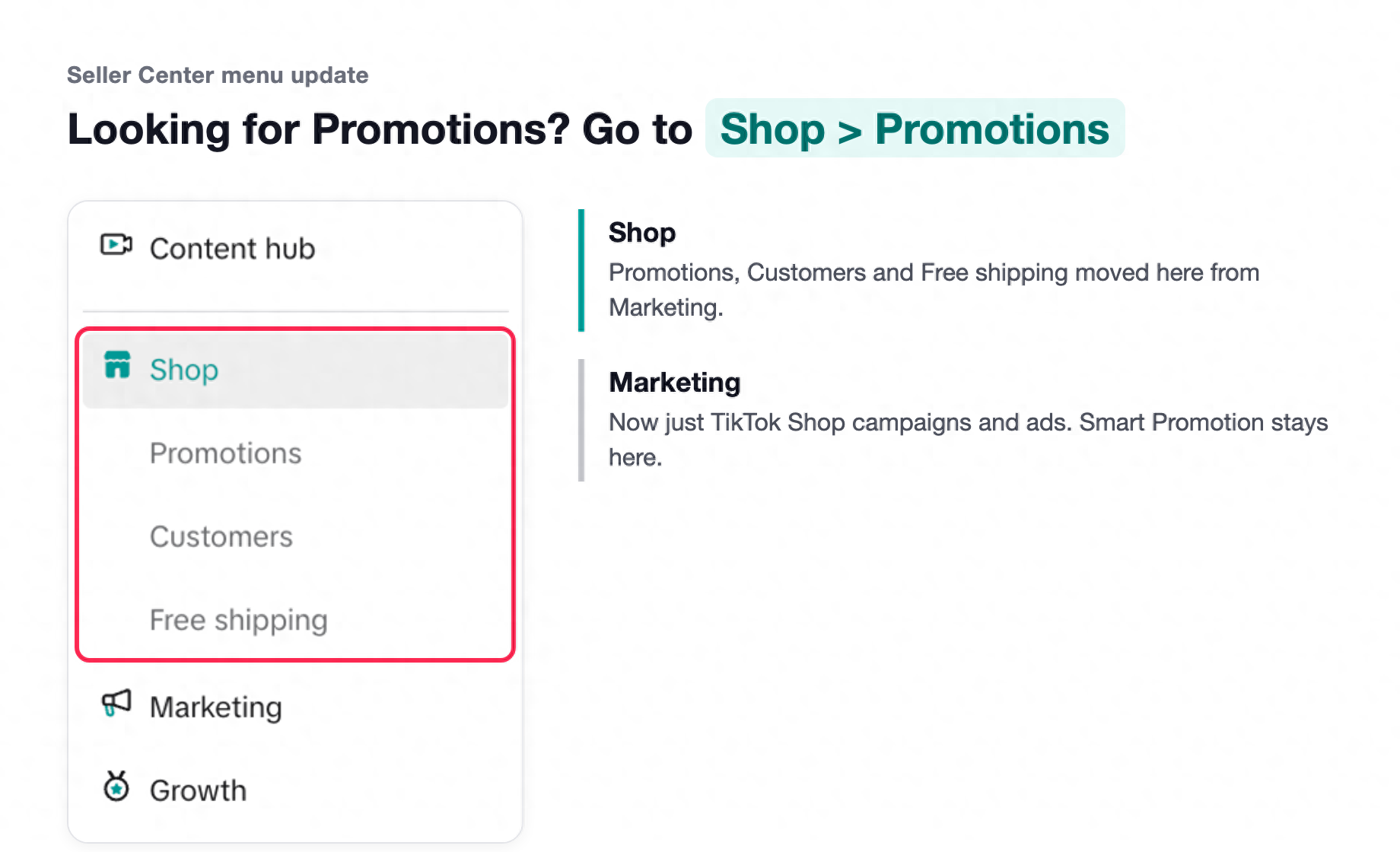
What's changed
- New Shop menu. Everything you set up for your own shop is now in one place: Promotions, Customers and Free shipping. These used to be under Marketing.
- Marketing is now for TikTok Shop campaigns and ads. It contains Shop ads, Campaigns and Smart Promotion. Tip: Shop = offers you create for your shop. Marketing = TikTok Shop campaigns and ads.
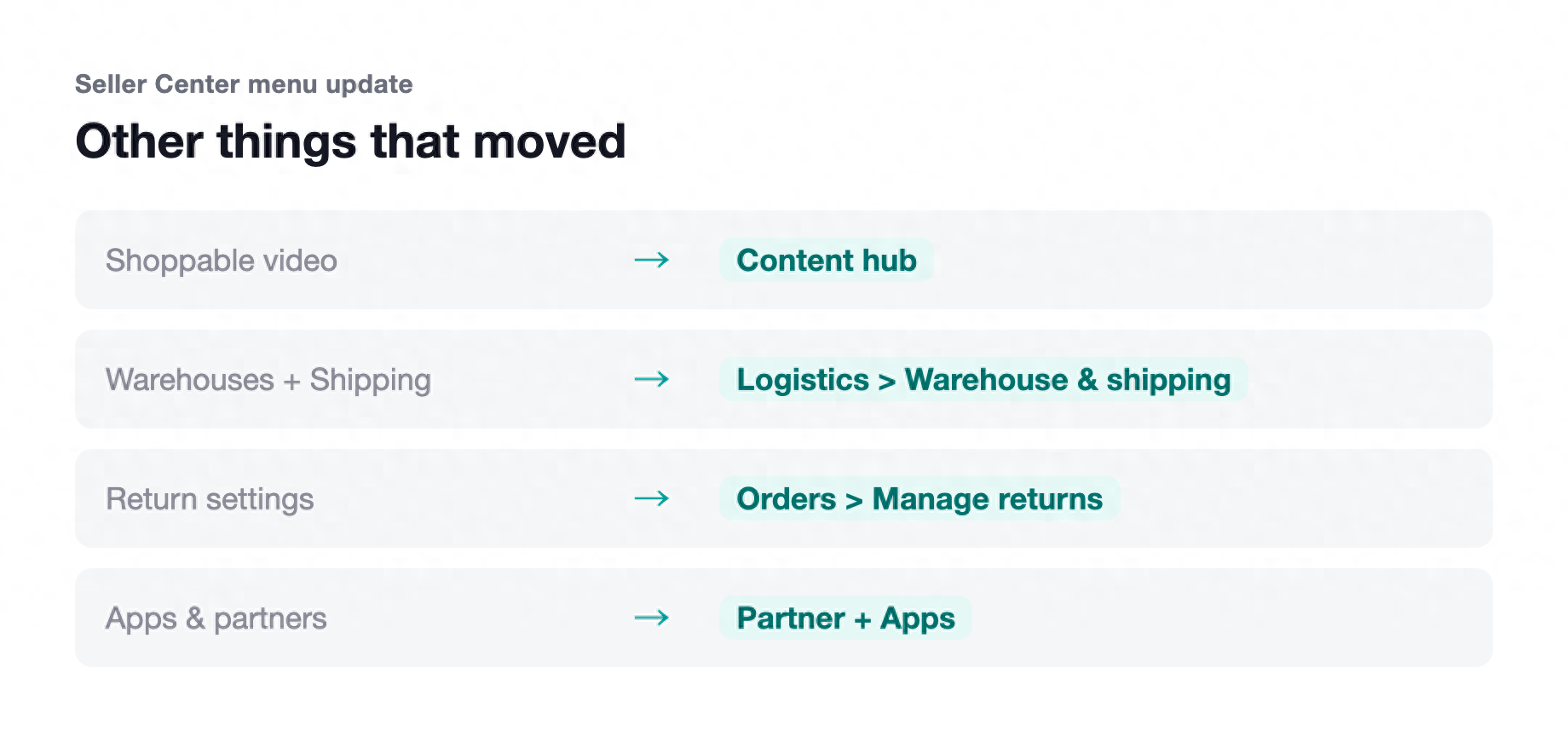
- LIVE selling and Content hub are separate menus. LIVE selling has its own menu. Shoppable video is now Content hub, with Management, Smart video and Carousel.
- Warehouses and Shipping are merged into Logistics > Warehouse & shipping.
- Return settings have moved into Orders > Manage returns.
- Apps & partners is now two menus: Partner and Apps. The Partner menu opens TikTok Shop Partner, where you can find service partners, and includes the Leaderboard. The Apps menu opens the App store.
- Top-level menus now open an overview page. For example, Orders opens Manage orders and Products opens Manage products. These two are no longer listed as sub-menus. The sub-menu still expands on the left.
- Growth stays. In Japan, Growth is still a top-level menu and contains My rewards.
Where to find things
If you want to… | Go to… | What changed |
View, process and ship orders | Orders (opens Manage orders) | Manage orders is now the Orders landing page |
Handle returns and set your return rules | Orders > Manage returns | Return settings moved here |
Check your fulfillment performance | Orders > Fulfillment performance | No change |
Manage, add or edit products, view product ratings, bundles and product opportunities, or use Sales Accelerator | Products (opens Manage products) | Manage products is now the Products landing page |
Set up warehouses, shipping and delivery options | Logistics > Warehouse & shipping | Warehouses and Shipping merged |
Work with creators, manage samples, view creator assets or track affiliate transactions | Affiliate | No change |
Set up and manage LIVE shopping | LIVE selling | Now its own menu |
Create and manage videos, smart videos and carousels | Content hub | Replaces Shoppable video |
Create and manage your promotions | Shop > Promotions | Moved from Marketing |
Reach your customers (share best sellers, announce new products, send LIVE reminders and price-drop alerts) | Shop > Customers | Moved to Shop |
Set up free shipping | Shop > Free shipping | Moved from Marketing |
Join TikTok Shop campaigns | Marketing > Campaigns | No change |
Create and manage ads (GMV Max) | Marketing > Shop ads | No change |
Use Smart Promotion | Marketing > Smart Promotion | Stays in Marketing |
Find growth opportunities and claim rewards | Growth > My rewards | No change |
Review shop performance and business insights | Analytics | Opens Shop analytics |
Check account standing, creator health rating, Shop Performance Score or account security | Account health | No change |
View bills and earnings | Finance > Bills / Earnings analytics | No change |
Find a service partner or view the partner leaderboard | Partner | Now its own menu |
Find and manage third-party apps | Apps (opens App store) | Now its own menu |
Disclaimer: Available Seller Center modules may vary by seller account type. Some features (for example, Sales Accelerator) are only available to some sellers.
Frequently asked questions
- I can't find Promotions. Where are they?
Go to Shop > Promotions. Smart Promotion is a different tool and is still under Marketing.
- Where are my return settings?
In Orders > Manage returns. You can now handle returns and set return rules in one place.
- Where did Shoppable video go?
It's now Content hub. LIVE tools are under LIVE selling.
- Will I lose any features?
No. Only the menu layout has changed. Your feature access and account permissions are the same.
- Will my bookmarks still work?
Most will. If a bookmark doesn't open the page you expect, find the feature in the new menu and bookmark it again.
- Why does my Seller Center look different from someone else's?
The new menu is live for all sellers in Japan, but some features depend on your account type, so not every seller sees the same items. Use the menu in your own Seller Center as the reference.
- Why does clicking a top-level menu open an overview page?
Each top-level menu now opens a landing page with your key data and common actions. The sub-menu expands on the left at the same time, so you can go straight to a specific feature.
- I still can't find a feature or I've found a problem. What should I do?
Contact Seller Center Support. Include the feature name, a screenshot and your shop details.