

Auctions: Everything you need to know
What is an Auction
Seller onboarding
2.1 How can I become an auction seller
The auctions feature is available for all sellers that have a strong shop and creator performance. Learn more hereNew to TikTok Shop? Register as a seller here.2.2 Pre Auction check list
So you want to do an auction? Great, make sure you:✅ Have strong seller and creator performance
| For sellers | For creators |
|
|
Listing and Selling
3.1 How do I set enable the auction feature and list products?
Check out our Academy article to learn how to Enable the Auction feature + Add products1) Make sure you configure the Auction setting in the Seller Centre first by allocating dedicated auction inventory.
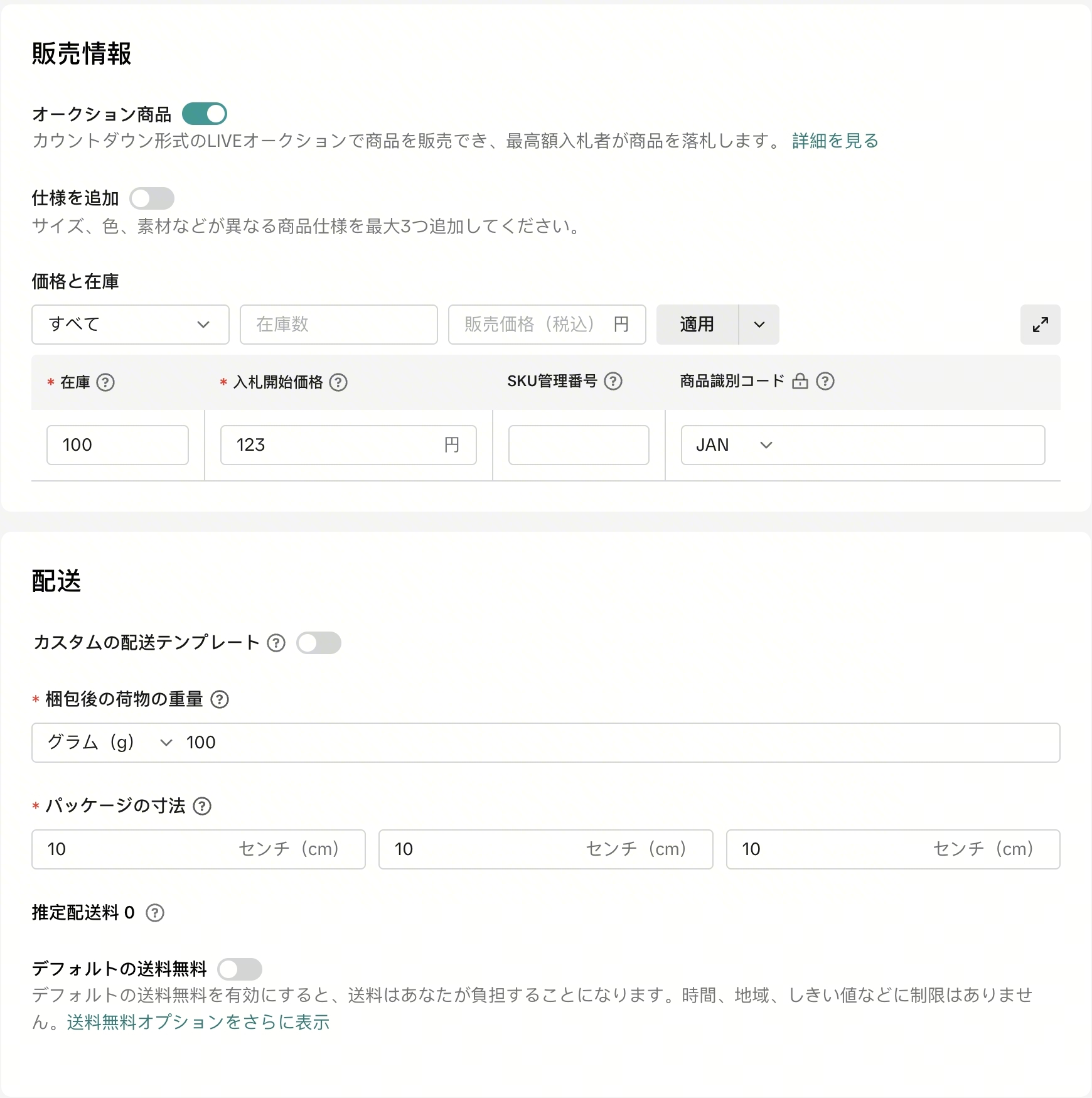
3) Leverage temporary listings for easily adding products to your Auction, as well as efficient order management and dynamic quantity tracking.
3.2 Which categories are available to sell in auctions?
Jewelry Accessories & Derivatives |
Tools & Hardware |
Baby & Maternity (excluding baby formula) |
Womenswear & Underwear |
Beauty & Personal Care |
Kids' Fashion |
Furniture |
Sports & Outdoor |
Home Supplies |
Luggage & Bags |
Fashion Accessories |
Computers & Office Equipment |
Household Appliances |
Phones & Electronics |
Pet Supplies |
Kitchenware |
Automotive & Motorcycle |
Health |
Modest Fashion |
Shoes |
Books, Magazines & Audio |
Textiles & Soft Furnishings |
Food & Beverages |
Toys & Hobbies |
Home Improvement |
Pre-Owned |
Menswear & Underwear |
Collectibles |
- Products related to political figures, political topics, or religion (including but not limited to Islamic products and shrine amulets)
- Relics or belongings of deceased persons
- Daily necessities during periods of disaster
3.3 Auction Selling Tips When Going Live 🎥
Use these tips to make your auctions engaging and compliant:✅ Do
| ❌ Don't
|
To avoid gambling or surprise based violations:
- Do not link auctions to prizes, rewards, or giveaways
- Avoid any tactics based on chance (e.g. random outcomes after purchase)
- Avoid unclear or incomplete product descriptions
- Make sure buyers clearly understand what they are bidding on
- Clearly defined items (e.g. specific cards, packs, sealed boxes)
- Auctions with hidden or random outcomes
- Prize-based tactics (e.g. bounties, rewards for hits)
Learn more about avoiding gambling violations on TikTok Shop 👉🏼 here
3.4 Surprise Sets
A Surprise Set is a type of auction product offering in which the exact item or items purchased are revealed after the auction ends. Access to the Surprise Set feature is limited to eligible sellers.Product and Category Requirements
- Products must be listed in an eligible category. Eligible categories include:
- Collectibles
- Pre-Owned
- The following products are not allowed in Surprise Sets:
- iPhones and iPads (new or refurbished)
- Televisions
- Diamonds
- Gift cards
- Bullion
All items in a set must come from the same category or sub-category. For example:
- Sport trading cards and non-sport trading cards cannot be included in the same Surprise Set.
- Jerseys cannot be included in the same Surprise Set as trading cards.
- Game consoles cannot be included in the same Surprise Set as cables, chargers, adapters, or console accessories.
- All items in a set must have similar retail or market value.
Pricing Limits
Sellers must comply with the following maximum bidding price limits per Surprise Set:- Maximum bidding price of ¥100,000 per set
Listing and LIVE Display Requirements
When creating and promoting a Surprise Set, sellers are required to:- Provide complete information for each possible item included in the Surprise Set, including:
- Brand or manufacturer
- Product name
- Condition
- Example:
- [Pre-owned] [Unused] [Insert Brand Name] 3-in-1 Charging Cable
- [Pre-owned] [Almost New] [Insert Brand Name] Wireless Controller
- [New] [Insert Brand Name] Protini Polypeptide Cream
- Do not use generic placeholders or proxy descriptions for potential items (for example, "Item #1," "Mystery Item," or "item on screen").
- List the quantity of each possible item included in the set.
- Select the correct eligible category and sub-category.
- Provide accurate product dimensions, where applicable.
- Explain the randomization and reveal process accurately.
- Use the official TikTok randomization tool for all Surprise Set reveals.
- External, offline, or manual randomization methods are prohibited.
- Surprise Sets must not be offered through pre-sales, loyalty programs, memberships, rewards programs, or similar arrangements.
- During LIVE:
- Display all possible items included in the Surprise Set on screen.
- Do not conceal or obscure possible items from view.
- Do not display a quantity of any item that exceeds the quantity actually available within the Surprise Set.
- Reveal the item received immediately after each Surprise Set purchase.
- Examples of prohibited practices include, but are not limited to:
- Displaying a blank screen or otherwise failing to show all possible items included in the Surprise Set.
- Concealing possible items from view, including placing them behind furniture, displays, or other objects.
- Displaying a greater quantity of an item than is actually available within the Surprise Set.
- Delaying or failing to reveal the item received after a Surprise Set purchase.
Prohibited Claims
For product listings and LIVE content, sellers must not use misleading, prize-like, or value-based claims when offering Surprise Sets. This includes, but is not limited to:- Monetary Value Claims
- Any guaranteed, implied, or comparative value, including:
- Minimum or maximum values (for example, 'floor of $X,' 'ceiling of $X')
- Value ranges or averages (for example, 'between $X and $X,' 'average value $X')
- Upside framing (for example, 'worth up to $X')
- Any guaranteed, implied, or comparative value, including:
- Market or Pricing Comparisons
- References to external pricing or valuation, including:
- Market prices or recent sales (for example, 'market price is $X,' 'last sold for $X,' 'based on comps')
- Grading- or authentication-based value (for example, 'PSA 10 chase,' 'certified worth $X')
- References to external pricing or valuation, including:
- Prize or Gambling-Style Language
- Framing that suggests winnings or chance-based rewards, such as:
- 'Grand prize,' 'jackpot,' 'golden ticket,' 'gamble ticket,' 'spin the wheel,' 'lottery'
- Framing that suggests winnings or chance-based rewards, such as:
- Investment or Appreciation Claims
- Claims or implications that items:
- Will increase in value
- Will retain value
- Should be treated as an investment
- Claims or implications that items:
- Scarcity or Urgency Framing
- Exaggerated or unverifiable rarity or urgency, including:
- 'Once-in-a-lifetime,' 'you’ll never see this again'
- Exaggerated or unverifiable rarity or urgency, including:
Customer Purchase Limits
The following purchase limits apply to certain product transactions in the following categories:- Customers under 25 years old may purchase up to 8 products per day in the following categories: Surprise Sets, card breaks (where packs of cards are opened live for a customer), lucky scoops (where a scoop of mixed items is sold), and blind boxes (sealed boxes containing a random collectible item).
- Customers who purchase 20 products in these categories (Surprise Sets, card breaks, lucky scoops, and blind boxes) will enter a 15-minute cool-off period before additional purchases in these categories can be made. After every additional 20 purchases in these categories, another 15-minute cool-off period will apply.
Cancellations, returns and refunds
4.1 Cancellations
If you sell items through auctions, here’s what you need to know about cancellations, returns and refunds:4.1.1 Cancellation requests before
shipping- Buyers can ask to cancel an order before it’s shipped.
- You need to respond within 2 working day.
- If you don't respond in time, the cancellation will be automatically rejected.
4.1.2 Cancellation or refund requests for delayed
dispatch/deliveries- If a buyer’s order is delayed beyond estimated delivery time, buyer can request a cancellation or refund and platform may auto-approve such request.
4.2 Returns and refunds
4.2.1 Return/Refund reasons
Products purchased via Auction are not eligible to be returned under the reason 'No longer needed'4.2.2 Return or refund after
item is received by buyers- Buyers can ask to return an item purchased through auction.
- Buyers have 14 days from the item delivery date to return the parcel
- All return requests need your approval. You'll be able to review every returned item before issuing a refund.
- After the parcel is sent back, you'll have 2 to 4 working days to inspect it and approve or reject the buyer's refund request. The exact timeframe depends on the value of the item.
You must not refuse or fail to process refund requests in a way that violates Buyers' legal rights. If you decline a request, the buyer can ask TikTok to step in accordance with the TikTok After-Sales Dispute Escalation Handling Policy
4.3 Consumer rejected delivery/failure to collect packages
Please note that buyers who purchase orders through auction format will not receive automatic refunds from refused delivery and if they fail to collect packages from local couriers.FAQs
- What are temporary listings and when will temporary listings be available?
- Where are Temporary Listings displayed?
- I received a violation during my Auction? What do I need to do?
- I'm a fashion seller and I keep getting a trademark violation, what should I do?
If you receive a violation ticket, it may be because you have breached the Seller Center Shop Health Violation Records guidelines.
If you believe the violation is an error, you can appeal in Seller Center. Learn more about appeals here.
- Are you a Trademark OR IP Owner and seeing a listing with a low price?
If you still believe the product infringes your IP rights, you may submit a takedown request through IPPC (TikTok’s internal tool) or via this webform. TikTok Shop will review and process the report in accordance with our IP policies.
TikTok Shop prohibits behaviors that undermine platform integrity, including potentially manipulative or deceptive activity. TikTok Shop reserves the right to remove access to this feature at any time for sellers engaging in such behavior.