

Campaign FAQ
Checking Registration Requirements and Conditions
How do I check if I meet the requirements for taking part in a campaign?
If you meet the conditions for taking part The register button will be clickable, so click on it to continue to register for the campaign.If you do not meet the conditions for taking part The register button will be greyed out and you will not be able to register.
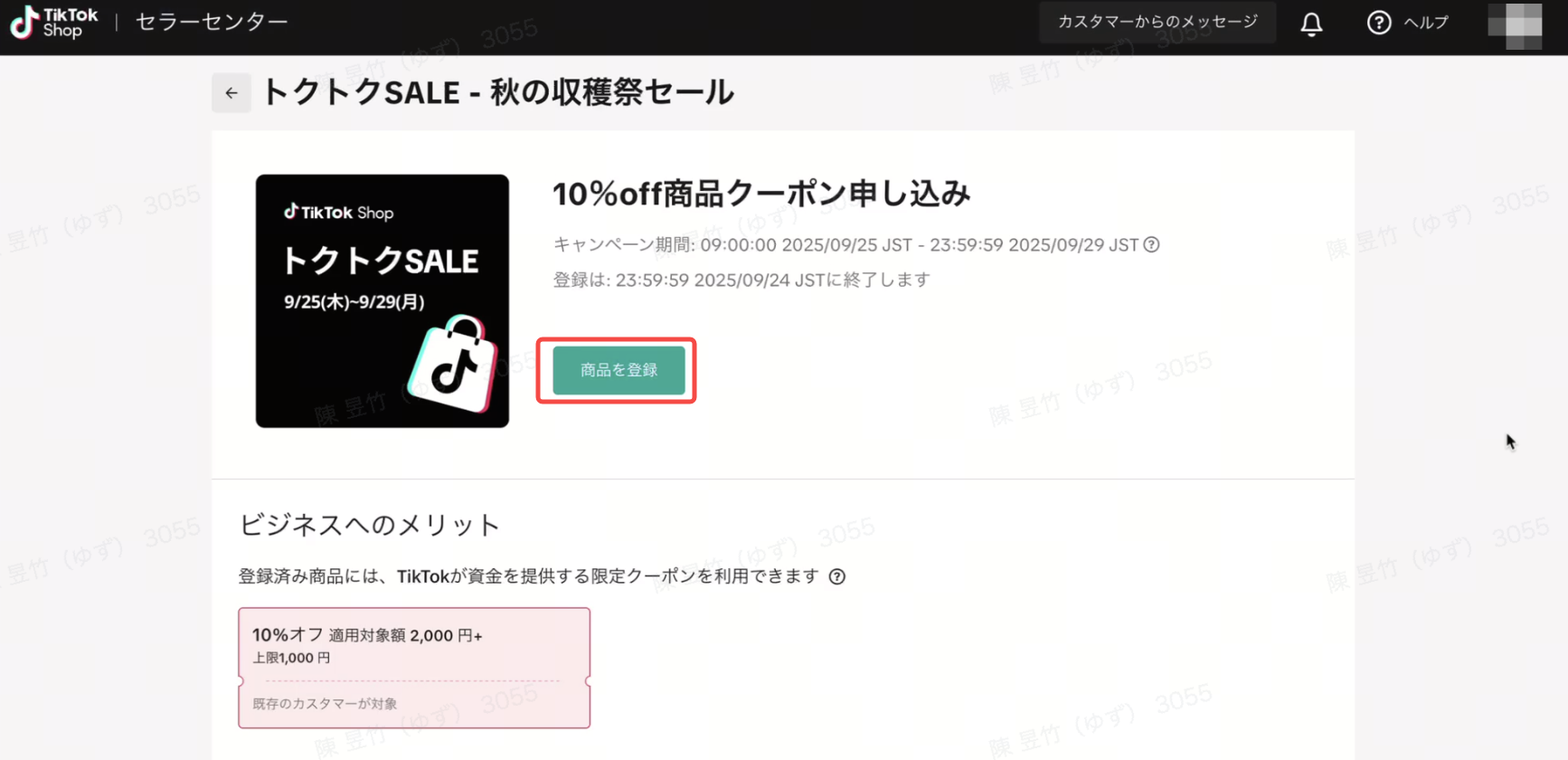
⚠️ NoteAll applications are reviewed by the TikTok Shop admin team. If you do not meet the conditions for taking part, you will not be able to register for the campaign.
How do I know if my shop or products are eligible for campaigns?
Your eligibility status will be shown on the Campaign Details page when you register for a campaign. For the full eligibility criteria, click "Review all criteria" on the Campaign Details page.How can I take part in a campaign?
- Go to Seller Center > Marketing > Campaigns. A list of campaigns currently open for registrations will be displayed.
- Pick a campaign you are eligible for from the list of campaigns that are open for registrations, then click Register now to go to the registration page.

When will I find out the results of my application to register for a campaign?
The TikTok Shop admin team takes an average of 5–14 days to review your application.Where can I check the campaigns I've registered for?
Click Manage to display details about a campaign you have registered for.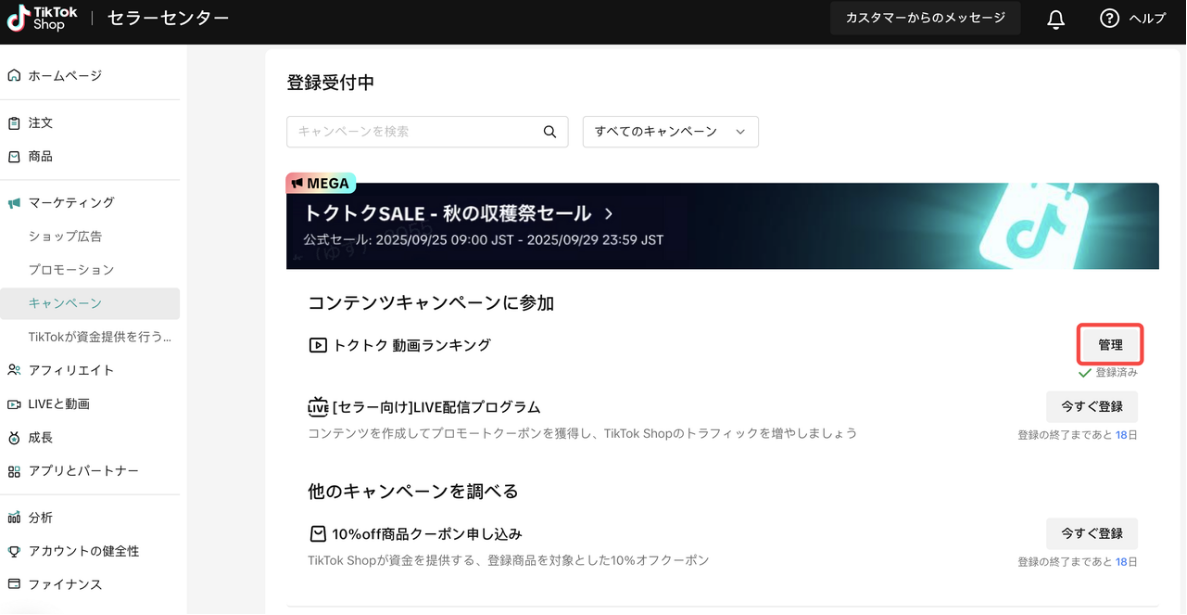

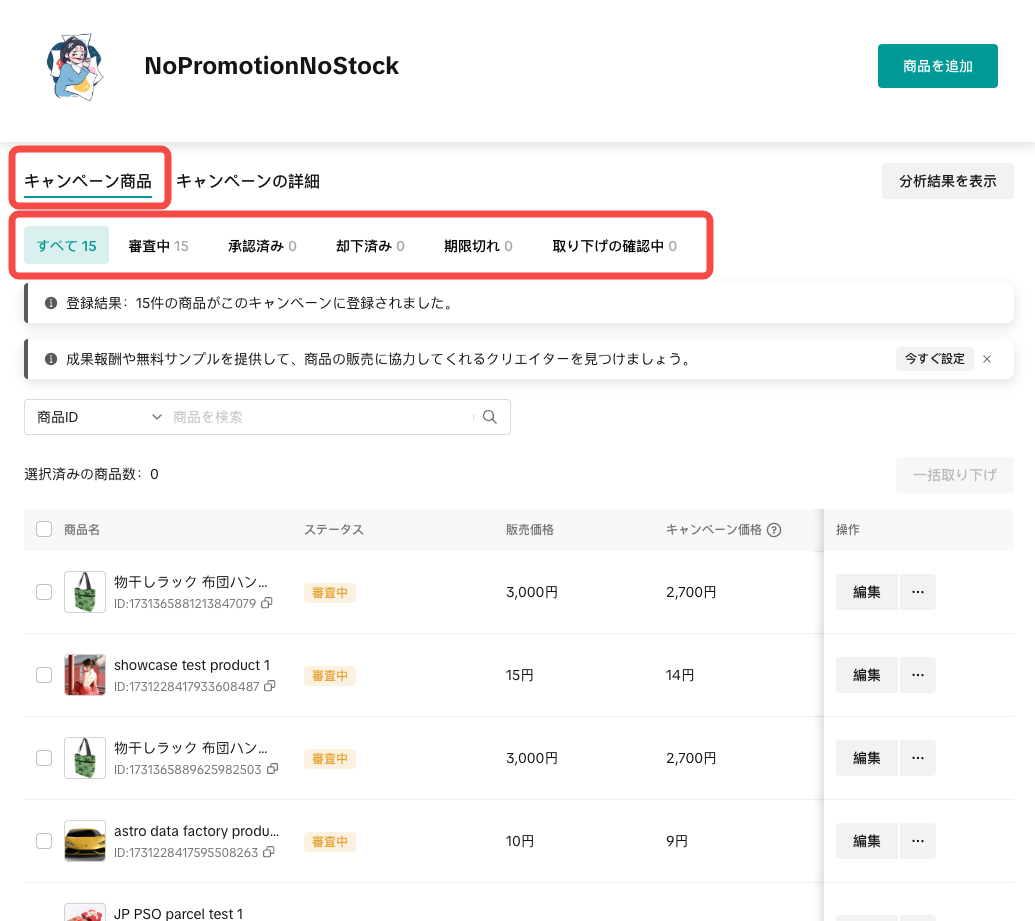
- Currently under review
- Approved
- Rejected
- Expired
This also applies to products which have not been approved before the start date, or which have been deleted due to a management decision.
- Withdrawal under review
Managing and Checking Registered LivestreamsAfter applying for a live campaign, select the Registered Livestreams tab to check the live sessions which you have an application underway for and their review status.
Why did the platform reject my registered products?
You can hover over the status tag to identify the specific reason a product(s) is rejected.Can I add or delete variations of registered products during the campaign?
No, sellers are not allowed to add or delete new variations (or SKUs) of the registered product in Campaigns. You will have to remove the registered product from the campaign to make variation changes.Can I withdraw from the campaign after I've registered?
To withdraw from a campaign, go to Seller Center > Marketing > Campaigns > Manage Campaigns to find your registration records. Then follow these instructions, based on the status of your campaign registration, to withdraw:- Under review
- Click the Delete button to cancel the registration
- Approved
- Click the Withdraw button to apply for withdrawal. If not auto-approved, a withdrawal application will be reviewed and the registration status will then be changed to expired. Otherwise, it will stay as approved
Why has my registered product "Expired"?
Here are some possible reasons:- The product violated TikTok Shop's policies, resulting in removal either before or during the campaign period
- The product did not meet the campaign eligibility requirements (see FAQs 1 and 2 above); or
- The campaign has ended
Why were my registered products removed from the campaign?
To maintain a high-quality shopping experience and ensure optimal campaign performance, TikTok Shop may remove products (PIDs) from campaigns at its discretion. Common reasons for product removal include:- Policy Violations: If a product violates TikTok Shop’s policies or guidelines
- Customer Experience Issues: Products that could negatively impact customer experience, such as inaccurate descriptions, unauthentic, unoriginal or poor-quality items
Campaign Price
What is the campaign price?
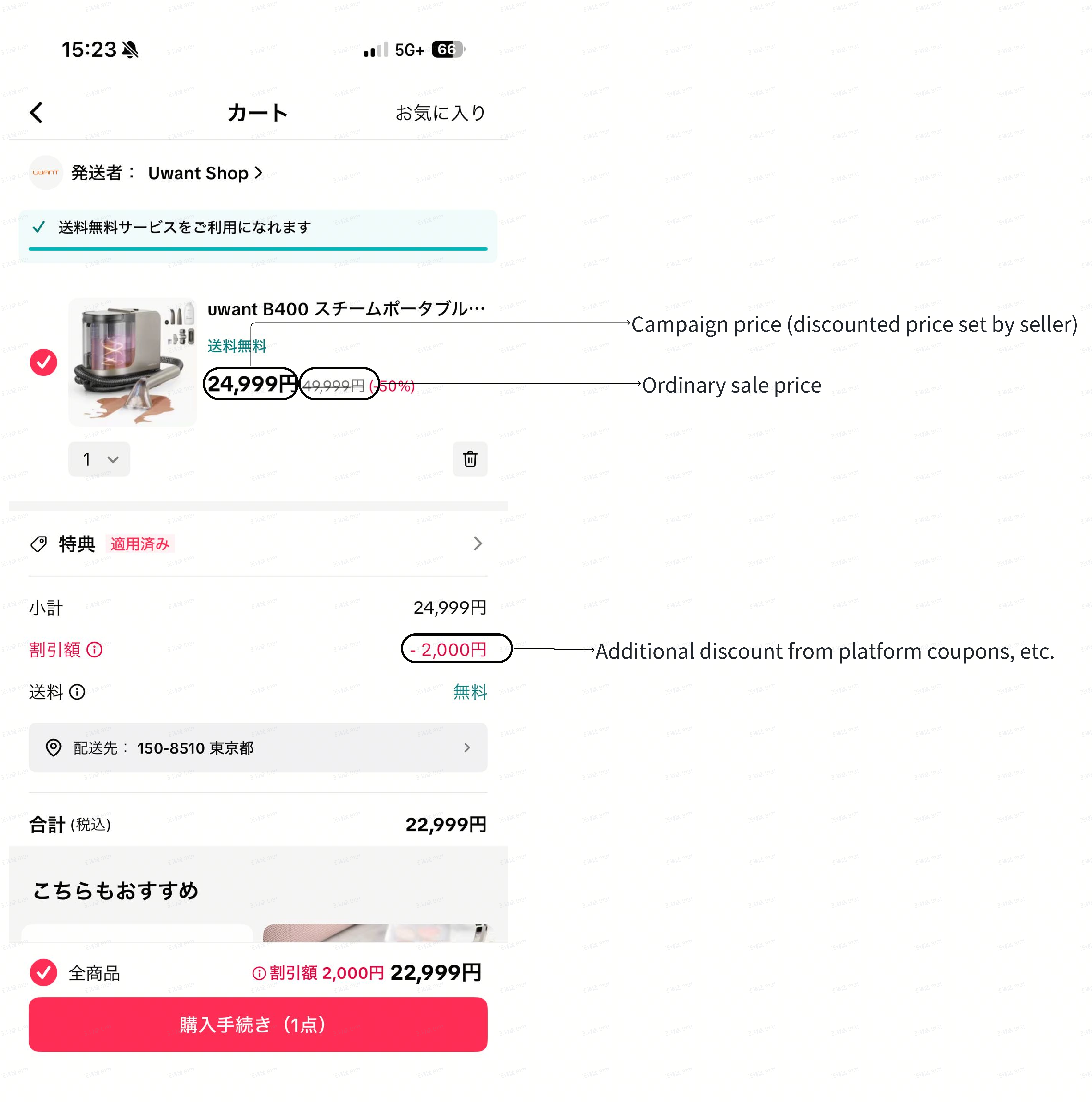
This refers to the actual sales price set by the seller, which excludes any platform subsidies (tax, shipping, platform coupons/discounts, etc.).Why do some products have their price struck through and some don't?
Strikethroughs are only shown if the campaign sale price is lower than the ordinary sale price.In the example below:
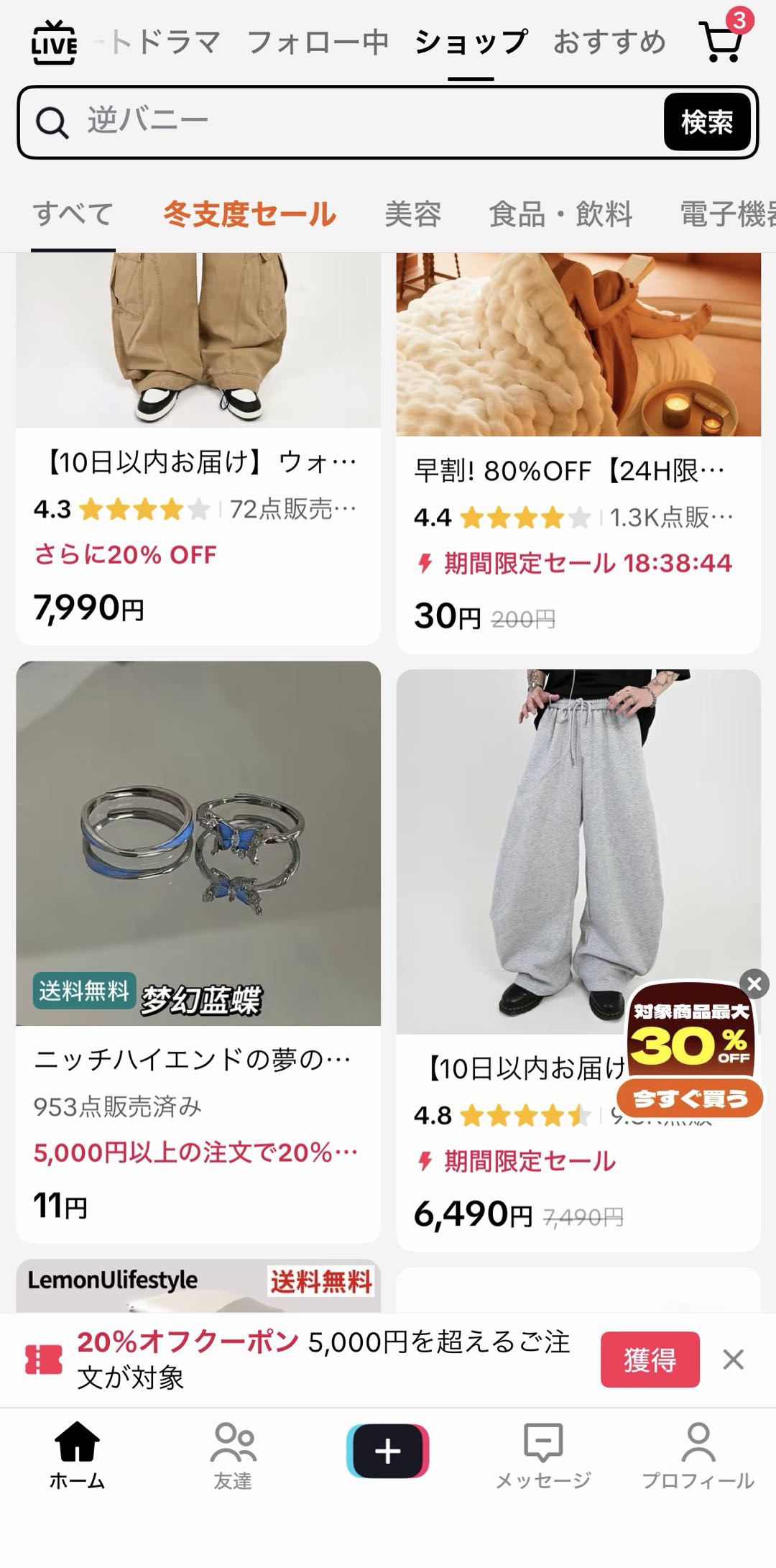 |
Also, the coupon is applied to the 6,490 yen (the campaign sale price). |
Is there a minimum price discount?
The Campaign Sale Price for some campaigns has to be lower than the retail price. Please refer to the specific campaign details during registration in Seller Center.When will the Campaign Sale Price go live?
The Campaign Sale Price goes live once the campaign starts and continues throughout the duration of the campaign. During the campaign, sellers are allowed to submit a price change. However, it may take up to 5 business days to complete the review.Coupons and Promotions
How will customers apply the Campaign coupon?
The coupon can be found on the event landing page, as well as on the product detail pages. The customer will need to tap "Claim" in order to apply the discount. The discount will be shown at Checkout.Why is my seller promotion not active?
The campaign sale price and your self-promotion tools, including discounts and flash deals, cannot be utilized at the same time. If the product is in an active campaign, the flash deal and discount set for that same time will not be active. For example, if the registered price of a product during the campaign is 6,700円 and you enter a flash sale price of 5,700円 while the campaign is active, the product will still show a price of 6,700円.Additional Questions
How do I find the Campaign landing page?
A banner will be visible on participating LIVE rooms with a 'View More' link directing customers to the Campaign landing page.Customers can also search in the TikTok app search bar for keywords during the Campaign (i.e. "Black Friday" or "Summer Sale").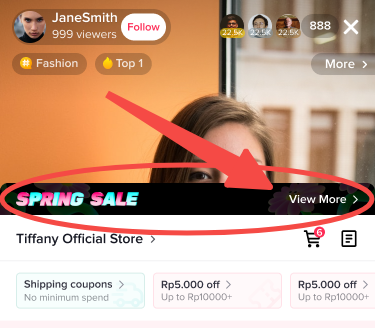
Does the calculation of the lowest campaign price in the past 30 days include discounts from the seller or seller coupons?
Amounts after seller discounts have been applied are included, but amounts after seller coupons have been applied are not.- 'Campaign price'
- Rules for Calculation
|
|
What price is used to calculate the commission rate?
The commission rate is calculated based on the price the user paid after seller discounts were applied. As platform subsidies (coupons/discounts) are borne by the TikTok Shop, these do not lower the commission rate.Please see the following for the specific formula used:
Commission = (User's actual amount paid - taxes + platform subsidies) × Commission Rate
- User's actual amount paid: The final amount paid after the order is confirmed
Any parts which are borne by the seller, such as seller discounts and seller coupons, are reflected in this amount.
- Excluded items: Platform coupons and platform discounts are not included in the calculation of the actual price.
Discount type | Who bears the cost | Effect on calculating commission |
| Platform Coupon | The platform | ❌ No effect |
| Platform Subsidy | The platform | ❌ No effect |
| Seller Discount | The seller | ✅ Has an effect |
| Seller Coupon | The seller | ✅ Has an effect |
Promotion Tools Stack Rule
Sub-Campaign Promotion Type Priority
- There are 3 types of sub-campaigns, ranked from highest to lowest priority:
- LIVE Flash Sales & Flash Sale
- Product Incentives (Platform Subsidy)
- No Promotion
- If two campaigns have the same promotion type, the lower price wins.
- Integrated campaigns may fall under product incentives, co-funded coupons, or no promotion, depending on setup.
- CFP(Co funding program)'s stack rule is the same as platform promotion tool.
Targeting Differences
- Different prices may apply based on the user type (new vs. existing customer) and channel (LIVE vs. Shop tab).
- Prices are evaluated per target user and channel, meaning a product could show different prices in different places.
- Promotion Rules
Annotation:Stackable: Can be used in conjunction with other promotion types.Special Rules: Promotion will follow the preset rules to take effect.Optimal In Default: Two promotions can not be applied together, only the promotion with the largest deduction will take effect by default, with no option for consumers.Alternative: Two promotions can not be applied together, the promotion with the largest deduction will be recommended automatically, and consumers can switch to another one by themselves.Configurable: Can set either Stackable or Mutually Exclusive while configuring.
Type | Shipping Fee Discounts(Platform) | Product Coupon &Promo Code(Platform / CFP) | New Customer Incentives (Platform) | Product Incentives(Platform / CFP) | Buy More Save More(Platform) | Campaign Price (No promotion) | Flash Sale(Seller) | LIVE Flash Sale(Seller) | Creator LIVE Flash Sale (Seller) | Shipping Fee Discount(Seller) | Coupon(Seller) | Seller Product Discount(including new arrivals) | Buy More Save More(Seller) | Gift with Purchase(Seller) | Seller Promo Code |
| Shipping Fee Discounts(Platform) | Optimal In Default | Stackable | Stackable | Stackable | Stackable | Stackable | Stackable | Stackable | Stackable | Co-funded Free Shipping > Seller Free Shipping > Platform Shipping Discount | Stackable | Stackable | Stackable | Stackable | Stackable |
| Product Coupon &Promo Code(Platform) | Stackable | Alternative | Configurable (if unstackable, Product Incentives takes effect) | Configurable (if unstackable, Product Incentives takes effect) | Stackable | Stackable | Stackable | Stackable | Stackable | Stackable | Stackable | Stackable | Stackable | Stackable | Stackable |
| New Customer Incentives (Platform) | Stackable | Configurable (if unstackable, New Customer Incentives takes effect) | Optimal In Default | New customers will see New Customer incentives; Repeat customers will see Product Incentives. The only difference for these two promotions is the target customer type. | Stackable | Stackable | CANNOT be stacked, display Flash Deal price | CANNOT be stacked, display LIVE Flash Deal price | CANNOT be stacked, Creator Flash Deal takes effect | Stackable | Stackable | Stackable | Stackable | Stackable | Stackable |
| Product Incentives(Platform / CFP) | Stackable | Configurable (if unstackable, Product Incentives takes effect) | New customers will see New Customer incentives; Repeat customers will see Product Incentives. The only difference for these two promotions is the target customer type. | Optimal In Default | Configurable (if unstackable, Product Incentives takes effect) | Stackable | CANNOT be stacked, display Flash Deal price | CANNOT be stacked, display LIVE Flash Deal price | CANNOT be stacked, Creator Flash Deal takes effect | Stackable | Stackable | Stackable | Stackable | Stackable | Stackable |
| BMSM(Platform) | Stackable | Configurable | Stackable | Configurable (if unstackable, Product Incentives takes effect) | Alternative | Stackable | Stackable | Stackable | Stackable | Stackable | Stackable | Stackable | Stackable | Stackable | Stackable |
| Campaign Price (No promotion) | Stackable | Stackable | Stackable | Stackable | Stackable | Optimal In Default | CANNOT be stacked, display the Campaign Price | CANNOT be stacked, display the LIVE Flash deal price | CANNOT be stacked, Creator Flash Deal takes effect | Stackable | Stackable | CANNOT be stacked, display the Campaign Price | Stackable | Stackable | Stackable |
| Flash Sale(Seller) | Stackable | Stackable | CANNOT be stacked, display Flash Deal price | CANNOT be stacked, display Flash Deal price | Stackable | CANNOT be stacked, display the Campaign Price | One product can only be in one flash deal event at the same period | Optimal In Default | Display both prices or if Creator Flash Deal > Flash Deal, display Flash Deal for creator | Stackable | Stackable | CANNOT be stacked, display Flash Deal price | Stackable | Stackable | Stackable |
| LIVE Flash Sale(Seller) | Stackable | Stackable | CANNOT be stacked, display LIVE Flash Deal price | CANNOT be stacked, display LIVE Flash Deal price | Stackable | CANNOT be stacked, display the LIVE Flash deal price | Optimal In Default | One product can only be in one flash deal event at the same period | Display both prices. If Creator Flash Deal > Live Flash deal, display Live Flash Deal for creator | Stackable | Stackable | CANNOT be stacked, display LIVE Flash Deal price | Stackable | Stackable | Stackable |
| Creator LIVE Flash Sale (Seller) | Stackable | Stackable | CANNOT be stacked, Creator Flash Deal takes effect | CANNOT be stacked, Creator Flash Deal takes effect | Stackable | CANNOT be stacked, Creator Flash Deal takes effect | Display both prices. If Creator Flash Deal > Flash Deal, display Flash Deal for creator | Display both prices. If Creator Flash Deal > Live Flash Deal, display Live Flash Deal for creator | Creator LIVE Flash Deal for Creator A + Creator LIVE Flash Deal for Creator B = Can be created | Stackable | Stackable | CANNOT be stacked, Creator Flash Deal takes effect | Stackable | Stackable | Stackable |
| Shipping Fee Discount(Seller) | Co-funded Free Shipping > Seller Free Shipping > Platform Shipping Discount | Stackable | Stackable | Stackable | Stackable | Stackable | Stackable | Stackable | Stackable | Optimal In Default | Stackable | Stackable | Stackable | Stackable | Stackable |
| Coupon(Seller) | Stackable | Stackable | Stackable | Stackable | Stackable | Stackable | Stackable | Stackable | Stackable | Stackable | Alternative | Stackable | Stackable | Stackable | Alternative |
| CRM Coupon(Seller) | Stackable | Stackable | Stackable | Stackable | Stackable | Stackable | Stackable | Stackable | Stackable | Stackable | Alternative | Stackable | Stackable | Stackable | Alternative |
| Seller Product Discount(including new arrivals) | Stackable | Stackable | Stackable | Stackable | Stackable | CANNOT be stacked, display the Campaign Price | CANNOT be stacked, display Flash Deal price | CANNOT be stacked, display LIVE Flash Deal price | CANNOT be stacked, Creator Flash Deal takes effect | Stackable | Stackable | Optimal In Default | Stackable | Stackable | Stackable |
| Buy More Save More(Seller) | Stackable | Stackable | Stackable | Stackable | Stackable | Stackable | Stackable | Stackable | Stackable | Stackable | Stackable | Stackable | One product can only be in one seller BMSM event at the same period | Cannot be stacked. One product can only be in BMSM OR GWP | Stackable |
| Gift with Purchase(Seller) | Stackable | Stackable | Stackable | Stackable | Stackable | Stackable | Stackable | Stackable | Stackable | Stackable | Stackable | Stackable | Cannot be stacked. One product can only be in BMSM OR GWP | Optimal In Default | Stackable |
| Seller Promo Code | Stackable | Stackable | Stackable | Stackable | Stackable | Stackable | Stackable | Stackable | Stackable | Stackable | Alternative | Stackable | Stackable | Stackable | Alternative |