

Product GMV Max Introduction
What is Product GMV Max?
Product GMV Max is TikTok Shop’s automated advertising solution designed to increase your total return on investment. It simplifies campaign setup by automatically selecting the best content, placements, and settings to help you drive more sales.How it works
It uses a mix of content sources, including your own videos, affiliate content, and product cards, to create ads that perform well. It also boosts both organic reach and paid delivery to help you grow your GMV.Any orders made through the products you promote — including affiliate content or organic views — will be counted under GMV Max in your Seller Center dashboard.Benefits:
Easy setup: You pick the products, your target return, and budget. TikTok does the rest.
Better ad spending: The system chooses the best videos and placements, so you get the most sales for your money.
Reach shoppers everywhere: Your ads appear across TikTok in many places — the For You feed, Shop tab, search results, and more — all in one campaign.
More sales from free traffic: GMV Max doesn’t rely only on ads. It also helps your products get seen organically by more people.
Use all types of videos: Whether they’re from you or creators, TikTok automatically picks the best ones to drive sales.
How Is GMV Max Different from Normal TikTok Ads?
Feature | GMV Max | Normal Ads (VSA/PSA) |
| Setup | Fully automated | Manual setup required |
| Creative Selection | Auto-selects best videos | You choose creatives manually |
| Traffic Focus | Paid ads + organic product visibility | Paid ads only |
| Attribution Window | Same-day (real-time) | 7-day click, 1-day view |
| Reporting Level | Product-level attribution | Shop-level attribution |
| Campaign Overlap | Cannot run alongside normal ads on same product | Can run multiple campaigns simultaneously |
| Ideal For | Sellers wanting hands-off, scalable growth | Sellers wanting control over ads and creatives |
Video Shopping Ads (VSA):These ads use a video - usually a short clip showing the product in action, benefits, or how to use it. Videos are more engaging and tend to get better attention on TikTok’s feed.Product shopping Ads (PSA):These ads use a product card, which is a static image with product info like the title, price, and sometimes a small thumbnail. They usually appear in search results or product listings.
First time users: Getting your Account Authorization right!
Before launching your GMV Max campaign, make sure all your accounts are connected and authorized correctly. This is a quick but essential step to ensure the system can run and access your creatives.What needs to be connected:
- Your TikTok Shop, TikTok ad account, and TikTok account must all be under the same Shop Business Center.
- The ad account must be set as the GMV Max account in Seller Center
How to set it up
- Set up the GMV Max ad account
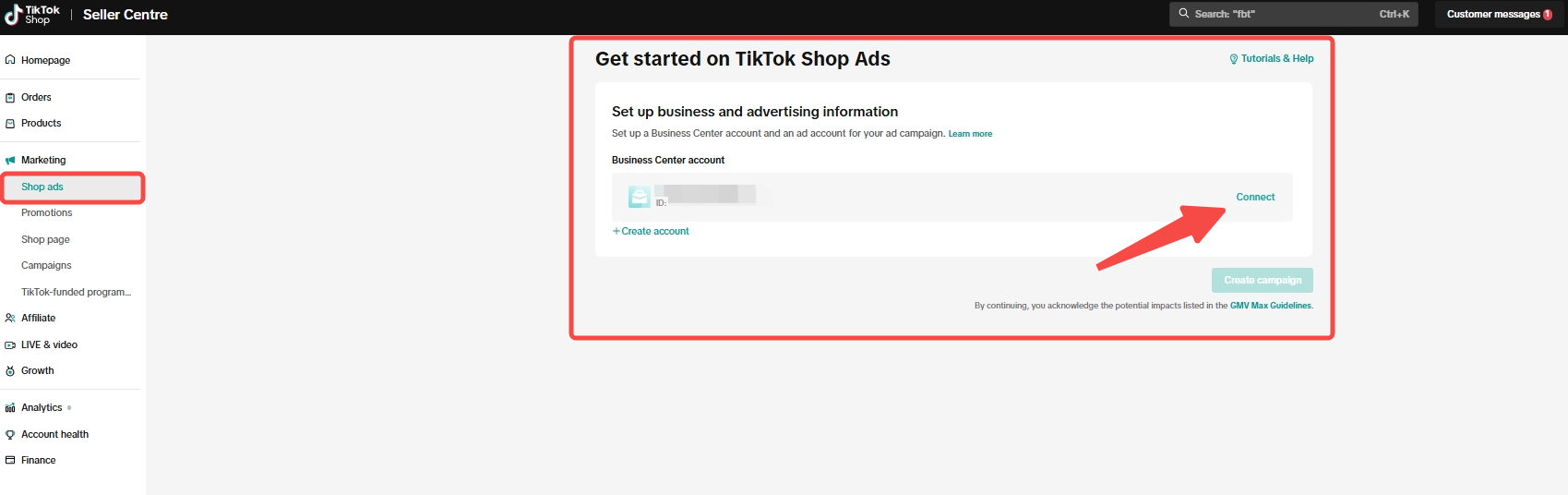
- Go to Seller Center > Marketing > Shop Ads > Manage Account
(If this is your first time, clicking on Shop Ads will take you directly to the "Manage Account" page)
- Connect your Business Center account to your TikTok Shop
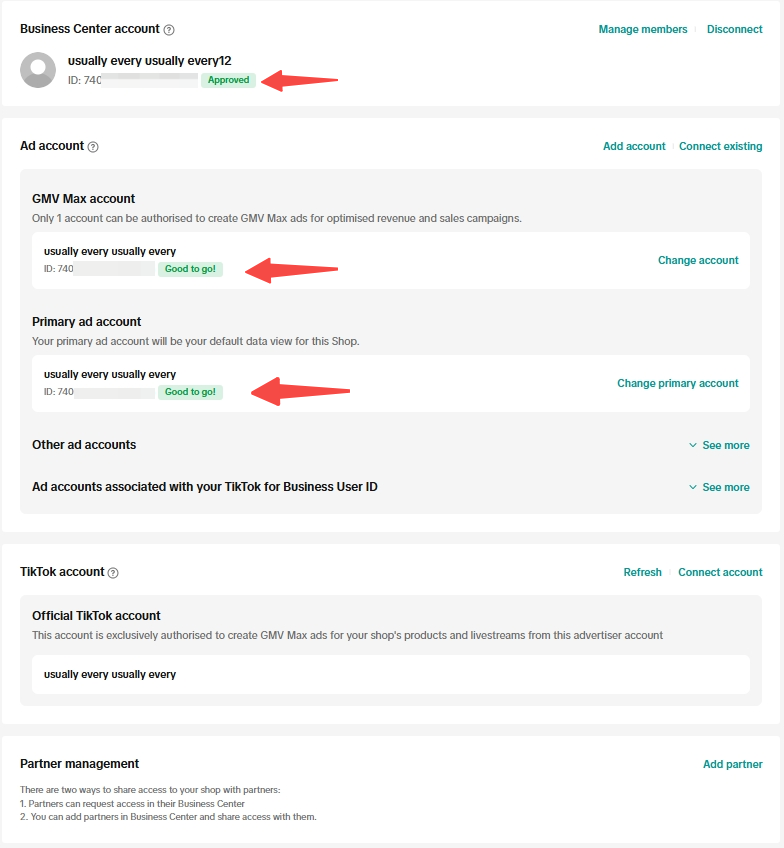
- Once connected and approved, you’ll see two ad account slots: one for your GMV Max account and one for your primary ad account (used for default reporting).
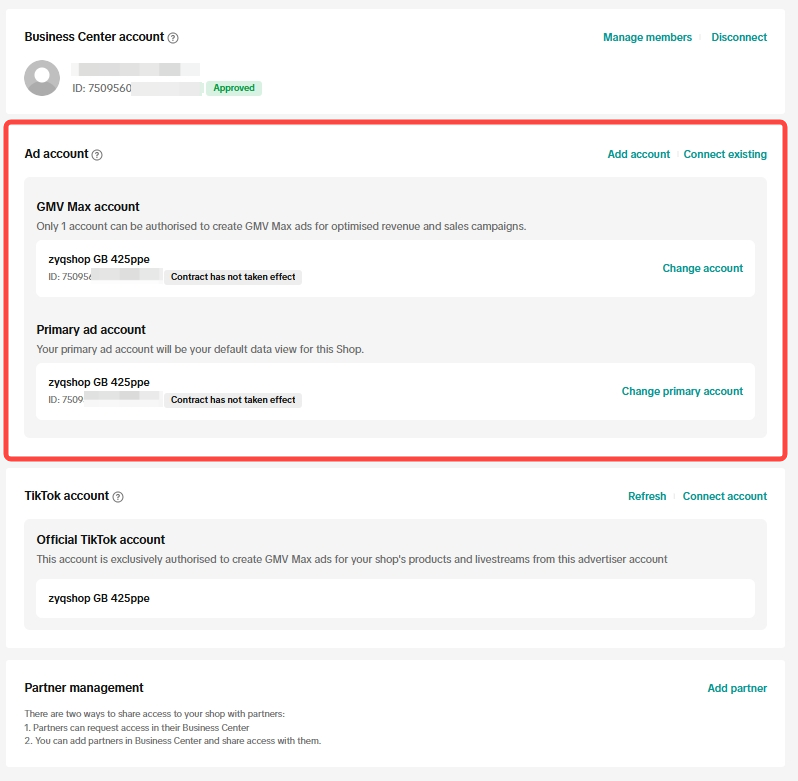
- From this view, you can also link your TikTok account and set partner permissions too.
Step-by-Step: Your First GMV Max Campaign
Step 1: Find GMV Max in Seller Center
- Log into your Seller Center.
- Click on the Shop Ads tab under "Marketing" in the left-hand menu.
- Click on "Create GMV Max"
Step 2: Create Your First Campaign
- Click the "Create GMV Max Ads" button in the top-right corner.
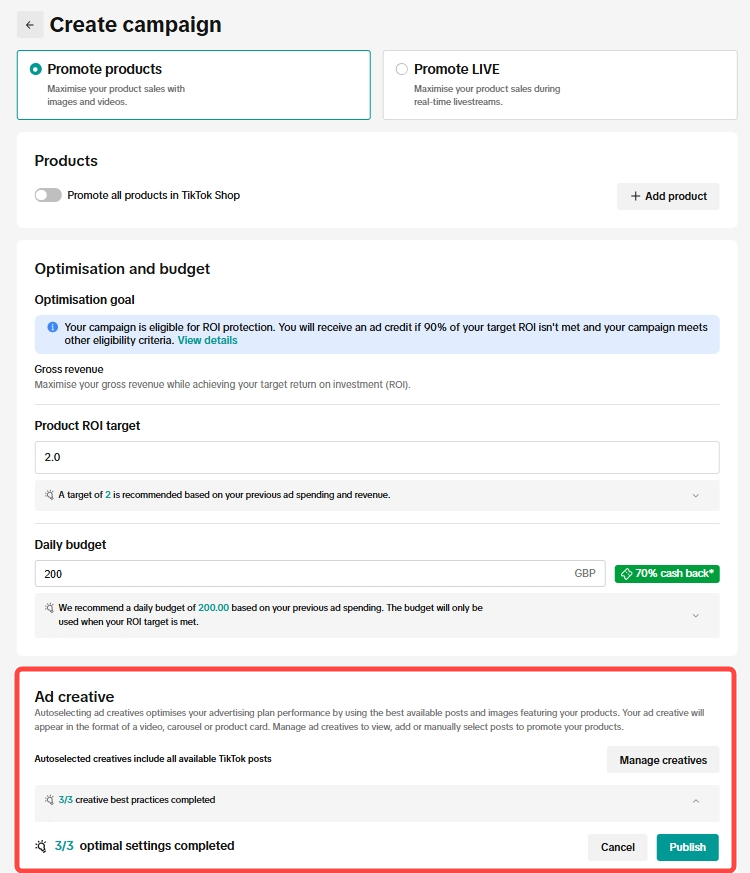
- Choose the products you'd like to promote. You can select all products or specific ones.

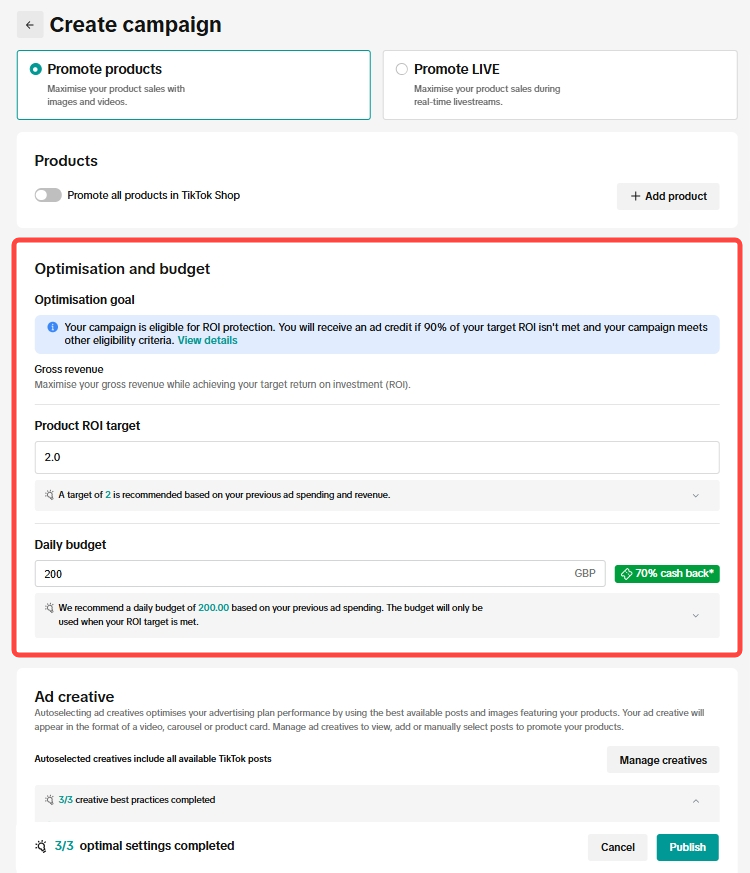
Set your ROI Target and Budget
- TikTok automatically recommends an ROI target based on past product performance.
- Follow this recommended ROI for best results.
- Use the automatically recommended budget provided by TikTok for best performance.
Choose your Creatives
Creatives are the videos TikTok uses to promote your products: these can be videos you’ve posted, influencer videos, or authorized affiliate content.- We strongly recommend selecting "Auto-select".
- TikTok automatically picks the best-performing videos to use.
You're almost done:
- Choose your campaign’s name and set the start and end dates in the Schedule section.
Publish your campaign!
- Once published, GMV Max will automatically pause any existing ads promoting the same products to ensure accurate results.
Making Your Videos Available
To improve performance, GMV Max needs access to videos it can use to promote your products. These videos are used to automatically create and serve ads across TikTok, and they’re a key part of what drives clicks and conversions.- Videos from your TikTok account linked to your shop
- TikTok accounts connected to Business Center with the right permissions
- Custom videos you manually add when setting up the campaign
- Affiliate videos that qualify for promotion
To make your videos usable:
- Post videos that include a product anchor (a clickable product link)
- Connect your TikTok account to your shop in Business Center
- Add custom videos when editing your campaign in Seller Center
Tracking Performance
After launching your campaign, you can track performance directly in Seller Center:- Go to Seller Center
- Click Shop Ads in the left-hand menu.
- Find your campaign in the campaign list.
- Click View details.

- In the Overview section for your campaign, you'll see different relevant metrics.
Learn more about the metrics:
- Cost: The total amount you've spent on your ads during your Product GMV Max campaign.
- Orders: The number of SKU orders generated by the products you included in your campaign.
- Cost per order: The average cost of each order attributed to your campaign. This is calculated by dividing the Cost by Orders (SKU).
- Gross revenue: The total gross revenue of TikTok Shop orders, both paid and organic, attributed to your campaign. This is the amount people pay, minus any sales taxes, plus any product discounts provided to them.
- ROI: The total return on investment (ROI) from all TikTok Shop orders attributed to your campaign. This is calculated by dividing the Gross revenue by the Cost.
Tips to improve your GMV Max performance
Not all videos or products perform the same. Here’s how to evaluate what’s working and how to improve.Focus on Gross Revenue Gross revenue shows the total amount of money your campaign brings in, whether it comes from paid ads or organic traffic. Use high-performing products or videos as examples to improve others.
Don’t judge only by ROI or Cost per Order These are useful metrics, but they mix both organic and paid traffic. A video with a higher cost might still drive strong results overall — so don’t remove it just because it looks expensive.
Watch for higher ad spend with strong results Sometimes, TikTok shows certain videos more often because they convert well, even if their cost is higher. These videos might have a lower ROI or higher cost per order, but they help bring in more GMV. Removing them could hurt your overall sales.
Frequently Asked Questions (FAQ)
Q1: Can I run GMV Max and regular TikTok ads on the same product?A: No. When you launch a GMV Max campaign for a product, any existing manual ads (Video Shopping Ads or Product Shopping Ads) for that product will be paused automatically.Q2: Why isn’t my GMV Max campaign spending budget?A: This usually happens if your ROI target is too high or your daily budget is too low. Also, make sure you have enough eligible videos (creatives) linked to the campaign.
Q3: How do I add more videos (creatives) to my campaign?A: You can add more TikTok videos featuring your products, or authorize influencer and affiliate content in Seller Center. The more high-quality videos you provide, the better your campaign will perform.
Q4: What is the attribution window for GMV Max?A: GMV Max uses a same-day attribution window. This means only sales that happen on the same day someone views or clicks your ad will be counted in your campaign results.
Q5: How do I check if my TikTok accounts are authorized for GMV Max?A: In Seller Center, go to Shop Ads > Manage Account to view your connected TikTok accounts and their status. Complete any pending authorization steps there.
Q6: Does GMV Max help increase my organic sales?A: Yes. GMV Max boosts both paid ad performance and organic product visibility, helping you drive more overall sales on TikTok Shop.
Q7: Do I need videos to start using GMV Max?A: No. GMV Max can run campaigns using product cards even without video content. However, adding videos, especially from affiliate creators, can improve visibility and performance over time.